
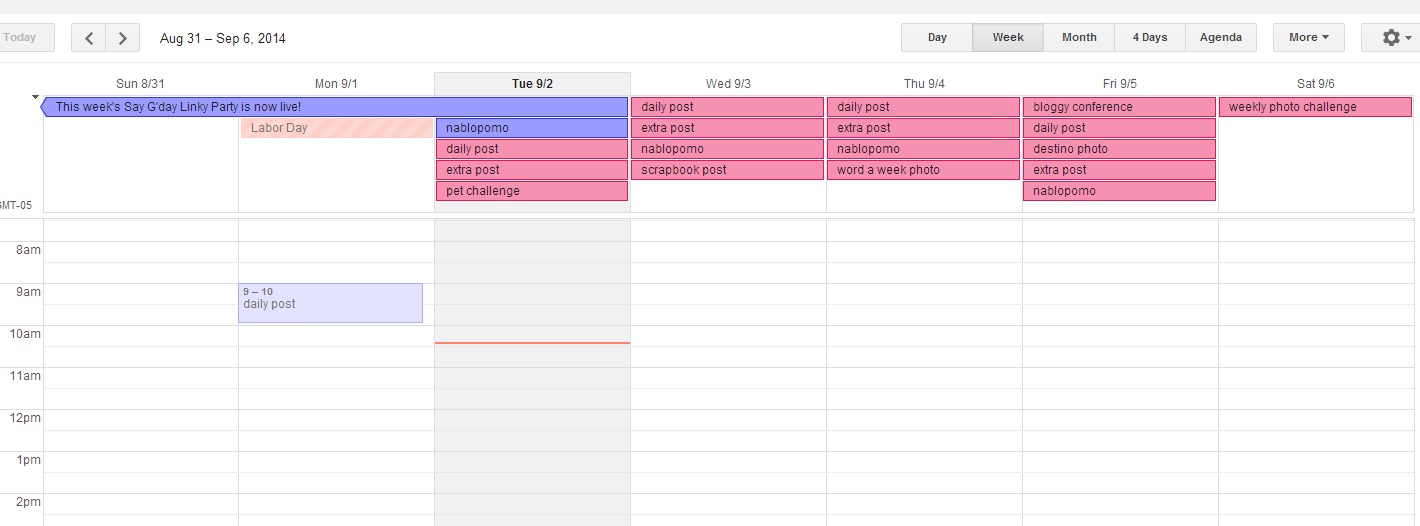
Life can get pretty hectic, especially with work, kids and blogging. I’ve talked about using a calendar before. So far I’ve had the best luck with the Google Calendar. It’s free. I also like the fact that I can see it on different devices.
There was a post that I read recently in which a blogger had their blog post calendar planned out for a year. That is dedication! At the moment, I have my blog calendar planned out for the month of September. I’m already feeling less overwhelmed. Today, I will be planning October. To keep things from being boring, I added a category of “Extra Posts.” So it can be any unplanned topic.
I also have certain posts scheduled on certain days of the week. For example, Michelle’s Weekly Pet Challenge starts on Tuesday so I have added the Pet Challenge post to Tuesday. I’m thinking about adding a weekly beer post but I haven’t picked a day yet.
To keep track of the blog calendar and real life calendar, I have blog posts in pink and real life stuff in blue. If anyone wants to get more involved in color coding blog topics, it’s always an option.
Another tool that has helped with planning posts is to schedule posts. WordPress offers the option to publish immediately, save as a draft or schedule. FYI: I have noticed that if I save as a draft and then want to schedule . . . it sometimes publishes the post immediately. So be prepared to have things published on the spot when you switch from draft to schedule.
WordPress also has a calendar widget. It seems to be more for your readers to see what you have posted on a particular day. I just added one today so we’ll see if it helps with anything or not.
Some people also make their own calendars in Excel. I don’t really like the spreadsheet format but that’s just my own personal taste.
CoSchedule and DivvyHQ offer calendars for a small fee. If you have a high volume of posts or multiple users, it may be worth the cost to stay organized.


This is a great tip! I’ve been using Excel (Open Office’s version) since starting my Blog, then doing a screen capture and editing it in Gimp to transform to a jpg. Whew! It sounds like Google’s calendar will be sooooo much quicker! Plus being accessible from other devices is a wonderful bonus! Thanks for this tip! 😀
You’re welcome! Glad it helped out! 🙂
I’m old school – I go for paper. Actually I confess, this is the first month I have a plan and I like to keep it flexible like the ‘extra posts’ idea. I got all excited last week when I saw 2015 diaries available, that’s some serious contemplation and book shop browsing for me (like I need an excuse!).